>
Showing posts with label Recover deleted passwords. Show all posts

Remove passwords on Excel password protected sheets and workbooks


Download Excel password remover
How many times has happened that you set a password on an Excel spreadsheet or workbook and then you forget about it? or worst, the person that setup the password on the spreadsheet no longer works with you, and you have a spreadsheet that can’t modify. what do you do? easy, use Excel Password Remover.


This program does not remove password set to open a spreadsheet i.e. if you are unable to open the file because it asks you for a password, this program won’t help you. this program is to remove the password to be able to modify an existing password protected workbook or spreadsheet, with that in mind let’s proceed on how to use it.
Download Excel password remover from this link http://www.straxx.com/excel/password.html the downloaded file should look like this:
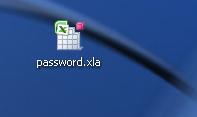
Password remover
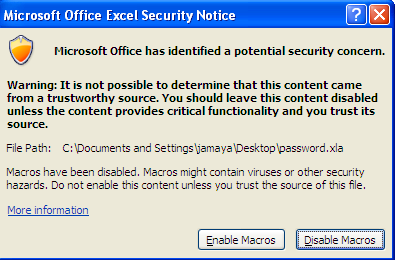
Then open your password protected sheet, or workbook. after the password protected sheet is open, click to open the password.xla add-in. you should get a warning like this:
Microsoft Office Excel Secuirty Notice
If you get a different message, probably you need to lower your security settings on yourexcel. If your current settings are high, set them to medium.
After you click on Enable Macros, you will get a pop-up saying the macro is loaded:
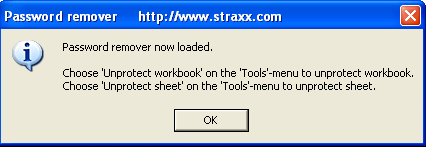
password remover loaded
After you get the pop-up, on Excel go to Tools, and click on Unprotect workbook andUnprotect sheet.
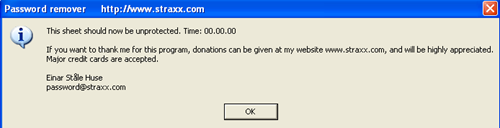
You should get a pop-up window when your spreadsheet has been unprotected:
this sheet has been unprotected
That’s it, your Excel workbook or spreadsheet should be now unprotected.

How to reveal a password hidden by asterisks


Download:AsteriskLogger
I just got a new computer and was re-installing all of my apps like FileZilla and WinSCP, etc, which are used to connect via FTP to some of my web sites. However, I could not remember my FTP passwords for the life of me and I didn’t have to because they were all nicely saved in the the FTP programs!
Unfortunately, the passwords were all hidden by asterisks and there was no way for me to transfer the passwords to the new computer. Then I found out that there is a way to reveal passwords that hidden by asterisks easily using a program from NirSoft.
These guys are great because they have already written several cool programs that I have written about before like ProduKey, which can be used to view the product keys for Office, etc, and Mail PassView, which can be used to recover passwords for Outlook, Eudora and Thunderbird, and MessenPass, which can be used to recoverr passwords for IM programs like MSN Messenger, Google Talk and AIM.
AsteriskLogger is another fabulous program from them that will reveal any password from a program that uses asterisks automatically.
This program has some nice features that make it better than any other password revealer:
  • No need to press a button to reveal a password. Simply open the program or window that has the asterisks and the password will be revealed inside the password box itself!
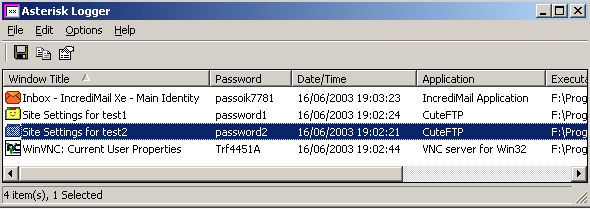
  • In the main window, Asterisk Logger will display more information about the revealed password such as the date and time the password was revealed, the name of the application, and the executable file .
  • You can save the passwords to an HTML file or to a text file also.
reveal hidden passwords
It works on Windows 98, Windows Me, Windows 2000, and Windows XP. It even works on Windows NT, but you have to download some file called psapi.dll and put it in your System32 directory. Even without the file, you can still reveal passwords, it just won’t show additional info.
There are some places where you will not be able to see passwords because they don’t store the passwords behind the asterisks for extra security, including Netscape 6.X, dialup and network passwords in Windows, and Windows usermanagement tools. It will also not work for passwords stored in Internet Explorer.
Overall, it worked wonderfully for me since my FTP programs stored the passwords behind the asterisks and I was able to recover all of my FTP passwords. It’s also useful if you have VNC programs and for some email programs like Outlook Express and IncrediMail. Enjoy!

Recover and hack Yahoo and MSN instant messenger passwords


Instant messenger password recovery tools are really necessary for someone like me who has to use 5 different instant messenger applications to talk to family, friends, co-workers, etc. However, with all of those messengers, I end up forgetting my password on a few of them some times. Of course, you could have the same password for each one, but I’m in IT and and I’ll about multiple passwords for security reasons.
Either way, you can use a nifty little program from NirSoft called MessenPass that you can use to recovery Instant Messenger passwords. Another program I had written about earlier from NirSoft helped those who needed to recover passwords for email clients such as Outlook or Gmail called Mail PassView.
MessenPass works in the same way as Mail PassView by revealing your password and username. It supports many Instant Messenger applications, including
  • MSN Messenger
  • Windows Live Messenger
  • Yahoo Messenger
  • Google Talk
  • ICQ Lite
  • AOL Instant Messenger (AIM)
  • Trillian
  • Miranda
  • GAIM/Pidgin
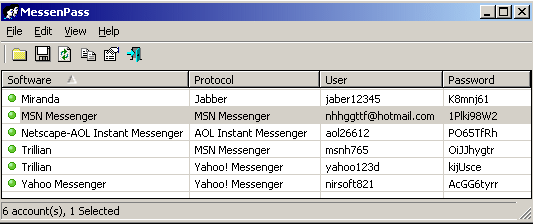
The program can only be use to recover the passwords for the current logged in user on the local computer. Also, it only works if you have chosen to remember the password in any of the above mentioned programs. It can’t reveal the passwords if you do not have it saved.
recover messenger password
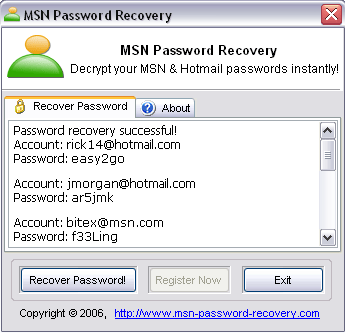
Another program that you can use to recover MSN Messenger, Windows Live and Windows Messenger passwords is MSN Password Recovery. Again, however, this program requires that the password already be saved where you can you log on automatically.
msn password recover
Another good program for recovering instant messenger passwords is Advanced Instant Messengers Password Recovery. It will try to decrypt any passwords that might be stored on your computer.

How to recover a lost PST password

Download:PSTPassword

There are a few tools out there that you can use to try and retrieve a lost PST password, one of which I have written about before called Mail Pass View, a free utility to recover lost email passwords.

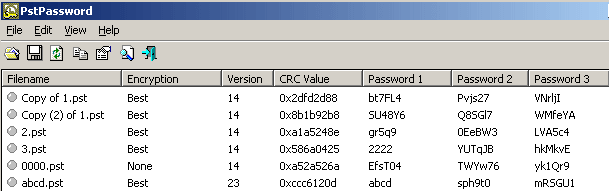
If Mail Pass View does not work for you, another free program you can try isPSTPassword. You can use this program to recover PST passwords for Outlook 2000, XP, 2003, and 2007!
The cool thing is that you don’t even need Office in order to recovery the PST password, only the PST file itself. Just choose your PST file and it will give you several passwords that you can use to open it!
recover lost pst password
That’s what is really cool about this program, you don’t even need the original password to open a PST file. The way the that Microsoft Outlook stores the password is what makes it easier to hack.
Basically, instead of storing the original password in an encrypted form, which would be harder to break, Outlook stores a 32-bit hash value that represents the original password.
However, this hash value can be generated using many different combinations of letters and numbers. For example, if you set a password to “1234”, the file can be opened using these passwords also: “hkNkwC” and “YUWqKD”. Go ahead and give it a shot if you think this is fake.
Note that the program will automatically find any PST files stored in the current user profile under
Document and Settings\User\Local Settings\Application Data\Microsoft\Outlook
If you want a different PST file, just drag it into the window or press F7 to browse for the file.
This is the only program out there that I know that is free! All other PST password crackers are commercial software packages. If neither of these two programs work, you might have to end up buying something, but hopefully not! Enjoy!

Recover, crack and hack email passwords for MS Outlook, Eudora, Thunderbird, etc


Download: Mail PassView
Recently I needed to recover a few passwords from email programs such as Outlook Express, Outlook 2003, Eudora, etc for some old user accounts. I ended up finding a very cool free utility that lets you hack email passwords. Basically, the passwords are stored in all email clients in either an encrypted format or in plain text. You can recover those passwords from just about email client pretty easily.
Mail PassView is a small password recovery tool that reveals the passwords and account details for many email clients as show below:
  • Outlook Express
  • Microsoft Outlook 2000 (POP3 and SMTP Accounts only)
  • Microsoft Outlook 2002/2003/2007 (POP3, IMAP, HTTP and SMTP Accounts)
  • Windows Mail
  • IncrediMail
  • Eudora
  • Netscape 6.x/7.x
  • Mozilla Thunderbird
  • Group Mail Free
  • Yahoo! Mail – If the password is saved in Yahoo! Messenger application.
  • Hotmail/MSN mail – If the password is saved in MSN Messenger application.
  • Gmail – If the password is saved by Gmail Notifier application, Google Desktop, or by Google Talk.
I was amazed at how well this program worked on my computer! I really didn’t expect it to work, but it not only showed me all the passwords for my Outlook accounts, but it also revealed the passwords for my Gmail and Yahoo mail accounts!
The program can actually hack your Gmail or Yahoo password if you have Google Desktop or Yahoo Messenger installed, respectively.
Once you have installed the program onto your computer, simply run it and you should see an output similar to this:
recover email password
As you can see from the above image, Mail PassView was able to determine all of my accounts in MS Outlook, including other information such as the server, type, and user names. It found ALL of my passwords for each account and they were actually correct! I was quite surprised! I would have thought the password in Outlook was a little more secure than that.
Also, I have Google Desktop installed, so it managed to reveal my Gmail password also. So next time you need to recover, hack or crack an Outlook or any other email client password, look no further than to Mail PassView! Enjoy!