>
Showing posts with label Freeware. Show all posts

VideoSpin


videospin
VideoSpin is a Windows-based video editing tool that is completely free and that is much better than Windows Movie Maker! It’s actually a product from Pinnacle, a leader in video editing software packages. So how is it better? Here are a couple of the features that you might like:
  • Mix videos, photos and music together by dragging and dropping
  • Choose from a large number of titles and transitions
  • Easily upload your video to the web in a snap!
  • Directly upload your video to YouTube and Flash support
There are also other nice features that you can usually only find in commerical video editing software, such as the ability to create scrolling titles and the ability to export your movie into flash format.
video editing software
VideoSpin supports a multitude of formats for importing video into the editor including the following:
Video: (.avi, mpg, .mpeg, .mod, .mp2, .mp4, .wmv)
  • AVI (DV AVI)
  • MJPEG
  • MPEG-1
  • MPEG-2 (optional) MPEG-4 (optional)
  • DivX (optional)
  • WMV
Audio: (.Wav, .mp3, .mpa, .m4a, .wma, .AVI)
  • Dolby 2ch (optional)
  • MPEG-1 Layer 2
  • MP3 Audio
You can use VideoSpin for other tasks other than video editing also. For example, you could import a video into VideoSpin and then extract the audio from the video file and save it as an MP3. You can also import a video in AVI format and export it out to MPEG4 format, thereby making VideoSpin into a video conversion utility.
The only thing that VideoSpin does not include is a way to capture video directly from a video device, such as a camcorder. It can only import video directly from your hard drive, a CD, DVD, or USB stick.
edit videos
Overall, VideoSpin is an excellent video editing software application. It has lots of transitions to choose from, the ability to add text on your videos, and easy incorporation of audio and images into your video.

Password protect programs and EXE files with Empathy


Download:Empathy
So why would you ever want to password protect a program?
Well, for lots of reasons! For example, maybe you have TurboTax installed on your computer, which does not have any built-in security, and you have other people who might use that computer. You certainly don’t want someone to be able to open TurboTax and see all of your financial information right!?
Currently, the only way to prevent someone from accessing that program would be to create another user account and secure your account with a password. However, there are always times when you just happen to forget to log off your account and someone comes along and sits down to use the computer.
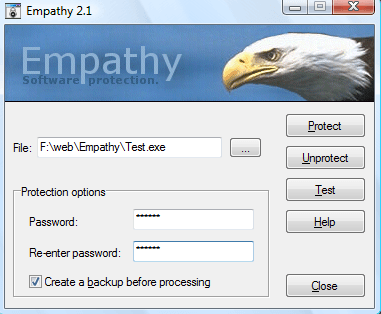
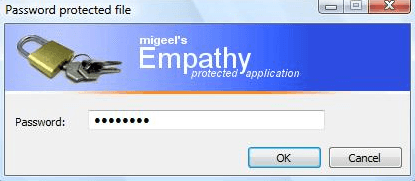
Empathy is a cool program that allows you to password protect Windows programs and EXE files. It can modify any EXE file so that it will require the user to enter a password before it can be run. This is fabulous for someone like me.
Now I can password protect my FTP program, my financial programs, my chatapplications, etc to add additional security on top of passwords and prevent other people from accessing my data and sensitive software.
password protect programs
The other cool thing about the program is that if you copy or move the EXE file to another location or even to another computer, the password will still be required, even if the operating system is different! Now that’s pretty cool!
This is also a great utility for portable apps that you might have on your USB drive. Sometimes you end up having to let someone borrow your USB stick, which means your data could be accessed, even if you have passwords setup. Using Empathy, you can password protect your portable apss also in case you have to lend out or you end up losing your USB stick.
password protect exe
The protected files can be run on Windows NT, Windows 95, Windows 98, Windows ME, Windows 2000, Windows XP, Windows 2003, and Windows Vista.
The only strange thing about the program is that when you download the program from his website, the unregistered version only allows you to use one letter to password protect a file.